

Write Once, Use Forever.
Think about the last time you explained your workflow to a new hire at work. You probably didn't just hand them a list of tools and wish them luck. You walked them through the process, explained why things work the way they do, and maybe showed them an example or two. Three weeks later, they're flying solo.
AI can't do that. At least not out of the box.
Every conversation starts from scratch. There's no memory of how you like things done, no recollection of the context you gave it last time, and no understanding of your process. Agent Skillsgive you a way around this by using a set of standing instructions that your agent can pick up whenever the job calls for it.
What are AI agent skills?
A skill is just a set of instructions for an AI agent to complete a task. They provide the guidance, context, and rules the agent needs to do the work the way you intended. Skills are particularly useful for writing, reasoning, planning, and other tasks that are largely about thinking --- but they can also teach the agent how to use other tools in your workflow. (More on that later.)
When you send a request, the agent checks which skills are available and decides whether any of them apply. If they do, it reads the relevant skill before responding.
To understand how that works in practice, it helps to see what a skill is actually made of.
Anatomy of a Skill
A skill is just a folder on your computer that the agent can read. The folder must contain one required file: SKILL.md, a plain text document written in Markdown. You can also include optional supporting files if your instructions need reference material.
Here's what a typical skill folder looks like:
.claude/skills/my-skill/
├── SKILL.md          ← required: name, description, and full instructions
├── examples.md       ← optional: sample outputs the agent can reference
└── templates.md      ← optional: formats or templates to follow
The example below is a skill produced by Anthropic to help agents work with PDF files:
'pdf' is the skill folder with a '\scripts' folder and various skill files (.md) inside it.
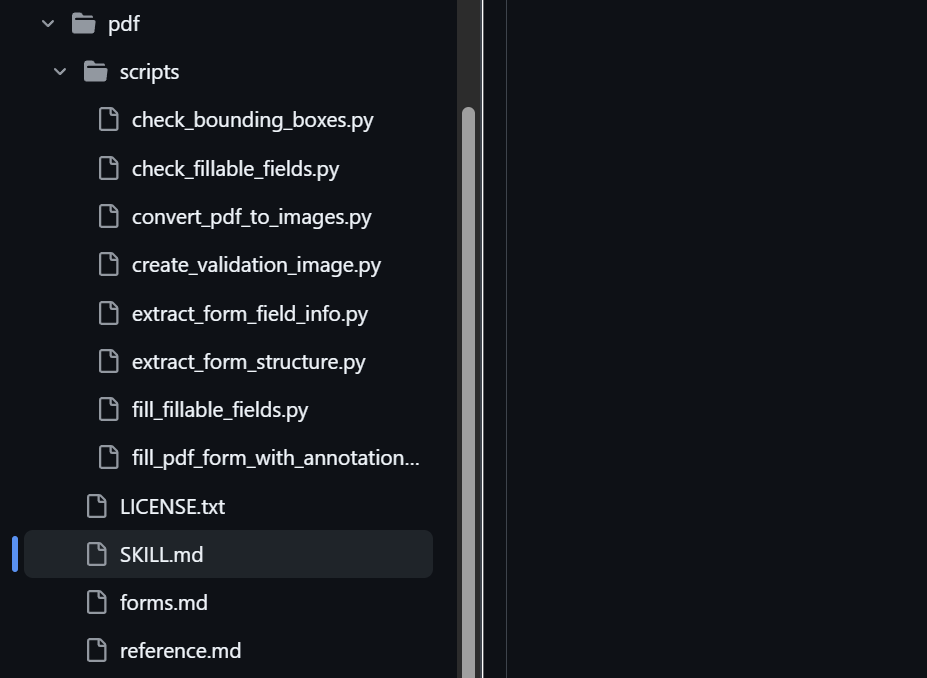
SKILL.md is the main skill definition. forms.md and reference.md are additional supporting skill files that the agent can refer to.
Looking inside the SKILL.md, there are two key parts.
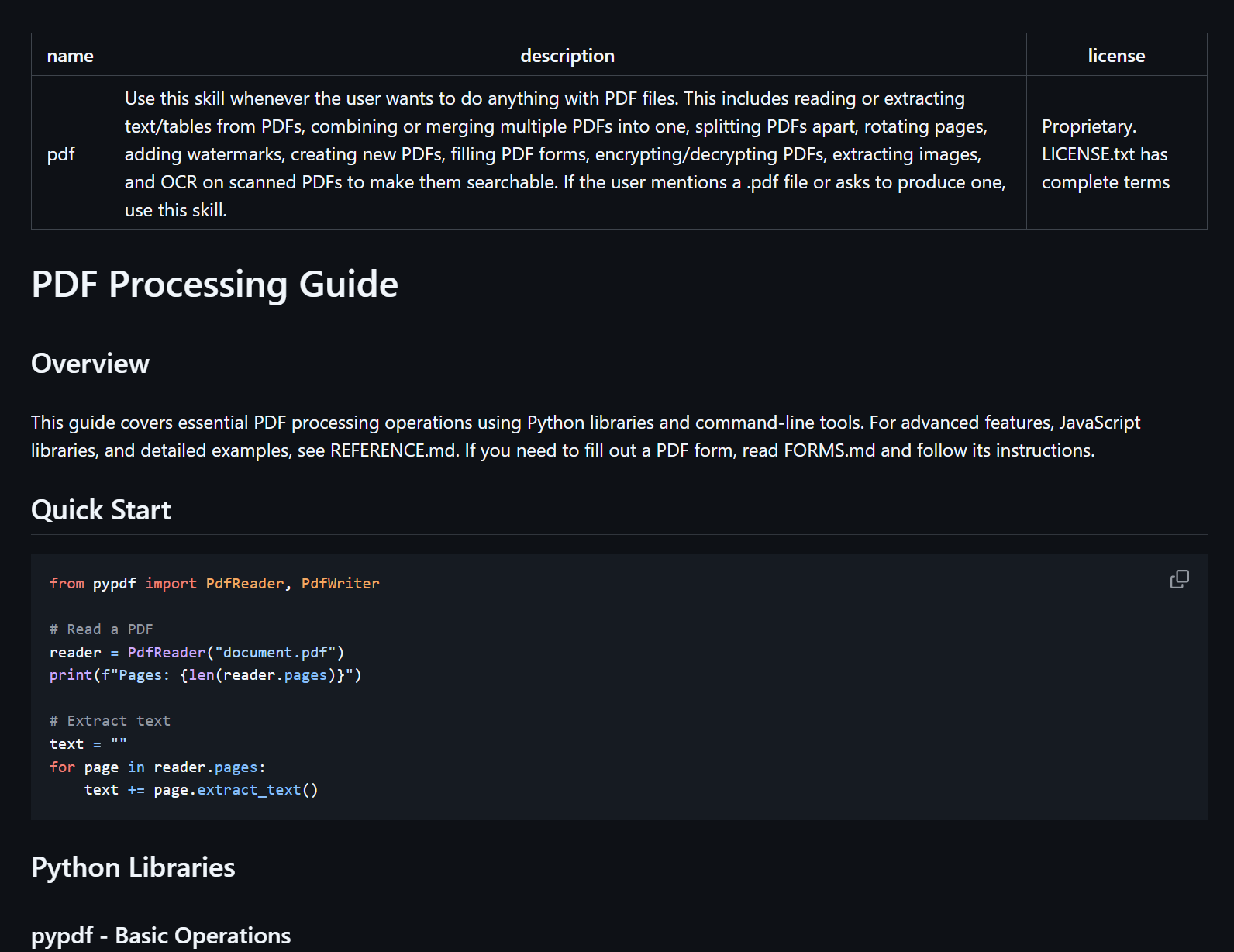
Skill header. The first thing in every SKILL.md is a short header block containing the skill's name and description. The description is the most important part: the agent reads it to decide whether this skill is relevant to what you've asked. Keep it under 200 characters.
---
name: pdf
description: Use this skill whenever the user wants to do anything with PDF files...
license: Proprietary. LICENSE.txt has complete terms
---
Instructions. Everything below the header is the body of your skill. There's no fixed structure: use headings, bullet points, and examples in whatever way helps the agent understand what you want. Think of it as writing a detailed brief for a colleague.
When writing instructions, you should:
Use headings to group related instructions together
Include context, constraints, and any rules the agent should follow
If you want the agent to follow a specific format, show it an example
Reference other files in the skill folder using: [link text](filename.md)
Here's a complete example of a skill for writing a weekly status update:
---
name: weekly-status-update
description: Use this skill when the user asks to write a weekly status update or progress report for their team.
---

# Weekly Status Update

Write a concise weekly status update in the format below. Use a professional but approachable tone. Keep it to under one page.

## Format

**This week:** Summarise the 2–3 most important things completed or progressed.

**Next week:** State the 1–2 priorities for the coming week.

**Blockers:** List anything slowing progress or requiring a decision. Omit this section if there are none.

## Guidance

- Focus on outcomes, not activity. "Completed the client proposal" is better than "Worked on the client proposal".
- Use plain English. Avoid jargon unless the user's industry requires it.
- If the user provides bullet points or rough notes, synthesise them rather than reformatting them.
- Keep the total length under 200 words unless the user asks for more detail.
How Skills are Loaded - The Progressive Disclosure Mechanism
Skills don't all load at once. The agent uses a three-stage system that keeps things light, loading only what it needs for each task.
Skill names and descriptions (always loaded)
When your agent starts up, it reads just the name and description from every installed skill. This is a small amount of information per skill, which means you can have dozens of skills set up without any real cost. At this stage, the agent knows what each skill is for and when to reach for it.
Full instructions (loaded when relevant)
When your request matches a skill's description, the agent reads the full SKILL.md. It's worth keeping this under 500 lines to ensure the agent can process it quickly and reliably.
Supporting files (loaded as needed)
If the instructions reference additional files or scripts, those are only loaded when they're actually needed. This means you can include extensive reference material, worked examples, or templates without any overhead for content that isn't being used.
Instructions are progressively loaded into context as and when they are needed.
Skill Libraries
Since skills are just folders of text files, they can easily be shared and installed. There are plenty of skill libraries available on GitHub. Some are official, some are community-built, so treat third-party skills with appropriate caution.
You can add as many skills as you like, though it's worth removing any you're not actively using to keep things tidy.
Meta Skills
Yep, it's already been done: a skill to help your agent acquire new skills.
With this skill from Vercel set up, your agent will automatically find and suggest skills for common tasks you ask it to perform.
"Use this skill when the user asks 'how do I do X' where X might be a common task with an existing skill."
A Note on Security
Before you start installing every skill you find on GitHub, a brief word of warning.
Skills give agents new capabilities through instructions and, in some cases, code. A malicious skill could direct your agent to take actions you didn't intend. Depending on what access your agent has, this could mean your files being read, modified, or sent somewhere they shouldn't be.
If you use a skill from an unknown source:
Read everything - Check every file in the skill folder before letting the agent use it
Watch for external connections - Be cautious of skills that instruct the agent to fetch data from the internet
Look for unusual actions - Skills should do what they claim. Be wary of instructions that seem to reach beyond the stated task
Stick to skills you've created yourself or sourced from reputable providers. Your future self will thank you.
Skills, Tools, and Memories
It's worth being clear on the difference between skills, tools, and memories.
Tools
Tools are additional capabilities that let an agent do things, not just think about them. Without tools, an agent is limited to working with whatever text you give it. With tools, it can search the web, read documents, run calculations, or interact with other applications.
If you've ever asked an AI assistant for up-to-date information, it used a web search tool behind the scenes to fetch recent results before responding.
You can create your own tools as small scripts and bundle them inside a skill's scripts folder. The skill's instructions then tell the agent when and how to use them.
Memories
Each agent has its own memory file where it stores things worth keeping between conversations. You can ask the agent to remember preferences: your preferred writing style, your brand colours, whether you want UK or US English. The agent will apply them automatically from then on. Memories are useful for global rules and constraints that apply to everything your agent does.
You could ask the agent to remember a workflow --- "when I ask you to do X, do it this way" --- but you probably shouldn't. Skills and memories may sound similar, but they serve different purposes.
Skills vs Memories
Memories are always on
Every memory is included in every request you send. That's fine for short preferences, but if you start adding detailed instructions to your memory file, those instructions take up space that could otherwise be used for your actual work. Skills are different: the agent only loads a skill's full instructions when they're relevant to what you've asked. You can have dozens of detailed skills installed without any overhead when you're not using them.
Rules vs. workflows
Memories are best for short, global rules that apply everywhere: language preferences, tone guidelines, things the agent should always or never do.
Skills are better for anything involving steps, decisions, or context: how to write a particular type of document, how to structure a specific output, how to handle a recurring task. The richer and more detailed the instructions, the more clearly they belong in a skill rather than memory.
Portability
Memories are tied to a specific project or installation. A skill is just a folder of text files, so it can be copied, shared, backed up, or moved to a new project without any extra steps.
Writing Better Skills
Understanding how skills work is the starting point. Writing them well is a different challenge.
A poorly crafted skill can confuse the agent, produce inconsistent results, or quietly underperform without making it obvious why. If you want to dive deeper into skill authoring, I have a full best practices guide that covers advanced patterns, evaluation strategies, and technical details.
What About MCP Servers?
MCP (Model Context Protocol) servers are a way of connecting your AI agent to other tools and services. If you haven't come across the term before, think of them as integrations: an MCP server might let your agent read your calendar, search the web, update a spreadsheet, or interact with any number of other applications. Where skills provide the instructions, MCP servers provide the connections.
The two work together rather than competing. A skill might describe how you want the agent to handle a recurring task; an MCP server is what gives the agent access to the tools it needs to actually carry that out.
I've written another article covering MCP serversin more detail, including how to use them safely.